
Journey Builder API
Use Journey Builder APIs to start, process, complete, and retrieve results for backend-to-backend identity verification journeys.
Use the Journey Builder APIs to run a complete identity verification journey from your backend — start a journey, submit documents and selfies, and finalize verification.
These APIs are for backend-to-backend integration only. Do not call them from client SDKs. Learn when to use each set of APIs.
Prerequisites
- Obtain your API credentials — see API Credentials and Authentication.
- Identify your base URL by region:
- EU (Default):
https://api.idwise.com/ - UAE:
https://api-uae.idwise.com/ - Qatar:
https://api-qat.idwise.com/
- EU (Default):
- Have your
flow_idready from the IDWise dashboard.
AI integration prompt
Use this prompt with your AI coding assistant to generate a backend integration for the Journey Builder API. The prompt asks for the required project details first, then generates code for Python, Node.js, or C#.
Journey Builder API Integration Prompt
Copy this prompt into your AI coding assistant to generate a backend-to-backend Journey Builder API integration.
View Integration Prompt
You are an expert backend engineer integrating the IDWise Journey Builder API.

Before writing any code, ask me these questions one at a time:

1. What is your IDWise flow_id?
2. What are your IDWise API key and API secret? If I do not want to paste secrets into chat, ask me for the environment variable names instead.
3. Which backend framework or language are you using: Python, Node.js, or C#?
4. Which IDWise region should the integration use: EU, UAE, or Qatar?
5. Where will the document and selfie image files come from: local file path, uploaded file, object storage, or another source?

After I answer, generate a complete backend integration for the selected language or framework.

The integration must:

1. Use the correct regional base URL:
   - EU: https://api.idwise.com/
   - UAE: https://api-uae.idwise.com/
   - Qatar: https://api-qat.idwise.com/
2. Authenticate with Basic Auth using the API key and API secret.
3. Start a journey with POST /v2/start-journey using flow_id and a unique reference_no.
4. Save the returned journey_id.
5. Parse the start journey response payload to identify all required steps and the step_id for each step in the selected flow.
6. Use only the step IDs returned by the start journey response when calling POST /v2/process-journey-step. Do not hard-code step IDs or use step IDs from a different flow.
7. Add a helper function that prepares the files for each step by reading a mapping table keyed by step_id. The mapping table must use the step_id as the key and values for image and image2, for example: { "<STEP_ID>": { "image": "path-or-file-for-image1", "image2": "path-or-file-for-image2" } }. The developer must review the step IDs returned by the start journey response and fill in this mapping table for the current flow, because step IDs change between flows.
8. Submit each required document or selfie step with POST /v2/process-journey-step using multipart/form-data.
9. Complete the journey with POST /v2/complete-journey after submitting the required steps.
10. Retrieve the final result with GET /v2/get-journey-result.
11. Include success handling, error handling, and clear logging without adding backend polling or retry loops.
12. Keep API credentials out of source code by using environment variables in the final implementation.

Return:

1. A short implementation checklist.
2. Complete runnable code for the selected framework or language.
3. Required environment variables.
4. Example request and response handling.
5. A step-to-file mapping table that the developer must fill in, where each key is a step_id returned by the start journey response and each value contains image and optional image2.
6. Notes explaining how the helper function maps image sources to the step IDs returned by the start journey response.

Do not call these APIs from a client SDK or frontend app. This integration must run only on a trusted backend.
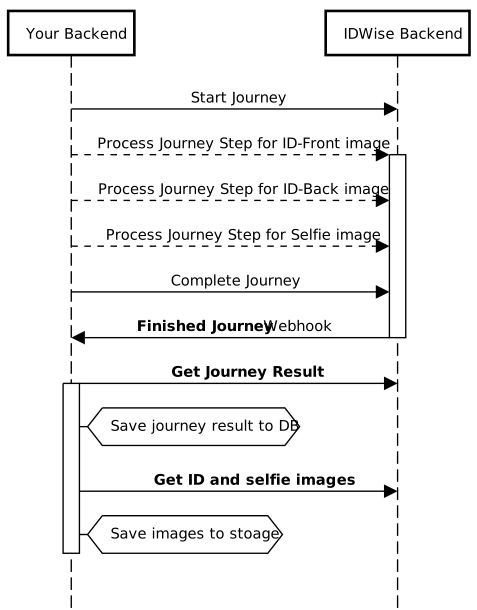
Sequence Diagram
The following diagram illustrates the full backend-to-backend integration flow:
Integration Steps
Start Journey
Create a new verification journey by calling POST /v2/start-journey. This returns a journey_id that you will use in all subsequent calls.
Request:
curl -X POST https://api.idwise.com/v2/start-journey \
  -H "Content-Type: application/json" \
  -u "YOUR_API_KEY:YOUR_API_SECRET" \
  -d '{
    "flow_id": "YOUR_FLOW_ID",
    "reference_no": "applicant-ref-001"
}'import requests
import base64
url = "https://api.idwise.com/v2/start-journey"
# Encode API key and secret as Base64 for Basic Auth
credentials = base64.b64encode(b"YOUR_API_KEY:YOUR_API_SECRET").decode("utf-8")
headers = {
"Content-Type": "application/json",
"Authorization": f"Basic {credentials}"
}
payload = {
"flow_id": "YOUR_FLOW_ID",
"reference_no": "applicant-ref-001"
}
response = requests.post(url, json=payload, headers=headers)
if response.status_code == 200:
data = response.json()
journey_id = data["journey_id"] # Save this for subsequent calls
print("Journey started:", journey_id)
else:
print("Error:", response.status_code, response.text)const axios = require("axios");
const url = "https://api.idwise.com/v2/start-journey";
// Encode API key and secret as Base64 for Basic Auth
const credentials = Buffer.from("YOUR_API_KEY:YOUR_API_SECRET").toString("base64");
const headers = {
"Content-Type": "application/json",
Authorization: `Basic ${credentials}`,
};
const payload = {
flow_id: "YOUR_FLOW_ID",
reference_no: "applicant-ref-001",
};
try {
const response = await axios.post(url, payload, { headers });
const journeyId = response.data.journey_id; // Save this for subsequent calls
console.log("Journey started:", journeyId);
} catch (error) {
console.error("Error:", error.response?.status, error.response?.data);
}import java.net.http.*;
import java.net.URI;
import java.util.Base64;
HttpClient client = HttpClient.newHttpClient();
// Encode API key and secret as Base64 for Basic Auth
String credentials = Base64.getEncoder()
.encodeToString("YOUR_API_KEY:YOUR_API_SECRET".getBytes());
String jsonBody = """
{
"flow_id": "YOUR_FLOW_ID",
"reference_no": "applicant-ref-001"
}
""";
HttpRequest request = HttpRequest.newBuilder()
.uri(URI.create("https://api.idwise.com/v2/start-journey"))
.header("Content-Type", "application/json")
.header("Authorization", "Basic " + credentials)
.POST(HttpRequest.BodyPublishers.ofString(jsonBody))
.build();
HttpResponse<String> response = client.send(request, HttpResponse.BodyHandlers.ofString());
if (response.statusCode() == 200) {
System.out.println("Journey started: " + response.body());
// Parse response.body() to extract journey_id
} else {
System.err.println("Error: " + response.statusCode() + " " + response.body());
}using System.Net.Http;
using System.Net.Http.Headers;
using System.Text;
using System.Text.Json;
var client = new HttpClient();
// Encode API key and secret as Base64 for Basic Auth
var credentials = Convert.ToBase64String(
Encoding.UTF8.GetBytes("YOUR_API_KEY:YOUR_API_SECRET")
);
client.DefaultRequestHeaders.Authorization =
new AuthenticationHeaderValue("Basic", credentials);
var payload = new {
flow_id = "YOUR_FLOW_ID",
reference_no = "applicant-ref-001"
};
var content = new StringContent(
JsonSerializer.Serialize(payload),
Encoding.UTF8,
"application/json"
);
var response = await client.PostAsync("https://api.idwise.com/v2/start-journey", content);
if (response.IsSuccessStatusCode) {
var body = await response.Content.ReadAsStringAsync();
Console.WriteLine("Journey started: " + body);
// Deserialize body to extract journey_id
} else {
Console.WriteLine($"Error: {response.StatusCode}");
}| Parameter | Type | Required | Description |
|---|---|---|---|
flow_id | string | Yes | Your verification flow ID from the IDWise dashboard. |
reference_no | string | Yes | A unique reference for this applicant. Alphanumeric and - _ / \ , . + @ allowed. |
applicant_details | object | No | Applicant info for AML journeys. Requires full_name; birth_date and sex are optional. |
Response (200):
{
  "journey_id": "a1b2c3d4-e5f6-7890-abcd-ef1234567890",
  "reference_no": "applicant-ref-001",
  "is_completed": false,
  "step_summaries": []
}
Save the journey_id — you need it for every following API call.
See the full Start Journey API reference for all parameters and response fields.
Process Journey Step
Submit documents and selfies for each step in the journey by calling POST /v2/process-journey-step. This API processes steps asynchronously — submit an image, then poll Get Journey Summary to confirm processing is complete before moving on.
Repeat this call for each required step (e.g., ID document front, ID document back, selfie).
Request (multipart/form-data):
curl -X POST https://api.idwise.com/v2/process-journey-step \
  -u "YOUR_API_KEY:YOUR_API_SECRET" \
  -F "journey_id=a1b2c3d4-e5f6-7890-abcd-ef1234567890" \
  -F "step_id=0" \
-F "image=@/path/to/id-document-front.jpg"import requests
import base64
url = "https://api.idwise.com/v2/process-journey-step"
# Encode API key and secret as Base64 for Basic Auth
credentials = base64.b64encode(b"YOUR_API_KEY:YOUR_API_SECRET").decode("utf-8")
headers = {
"Authorization": f"Basic {credentials}"
}
# Open the image file in binary mode
with open("/path/to/id-document-front.jpg", "rb") as image_file:
files = {
"image": ("id-document-front.jpg", image_file, "image/jpeg")
}
data = {
"journey_id": "a1b2c3d4-e5f6-7890-abcd-ef1234567890",
"step_id": "0"
}
response = requests.post(url, headers=headers, data=data, files=files)
if response.status_code == 200:
print("Step processed:", response.json())
else:
print("Error:", response.status_code, response.text)const axios = require("axios");
const FormData = require("form-data");
const fs = require("fs");
// Encode API key and secret as Base64 for Basic Auth
const credentials = Buffer.from("YOUR_API_KEY:YOUR_API_SECRET").toString("base64");
const form = new FormData();
form.append("journey_id", "a1b2c3d4-e5f6-7890-abcd-ef1234567890");
form.append("step_id", "0");
form.append("image", fs.createReadStream("/path/to/id-document-front.jpg"));
try {
const response = await axios.post(
"https://api.idwise.com/v2/process-journey-step",
form,
{
headers: {
...form.getHeaders(),
Authorization: `Basic ${credentials}`,
},
}
);
console.log("Step processed:", response.data);
} catch (error) {
console.error("Error:", error.response?.status, error.response?.data);
}import java.net.http.*;
import java.net.URI;
import java.nio.file.*;
import java.util.Base64;
// Encode API key and secret as Base64 for Basic Auth
String credentials = Base64.getEncoder()
.encodeToString("YOUR_API_KEY:YOUR_API_SECRET".getBytes());
String boundary = "----FormBoundary" + System.currentTimeMillis();
Path imagePath = Path.of("/path/to/id-document-front.jpg");
byte[] imageBytes = Files.readAllBytes(imagePath);
// Build multipart body
String bodyPrefix = "--" + boundary + "\r\n"
+ "Content-Disposition: form-data; name=\"journey_id\"\r\n\r\n"
+ "a1b2c3d4-e5f6-7890-abcd-ef1234567890\r\n"
+ "--" + boundary + "\r\n"
+ "Content-Disposition: form-data; name=\"step_id\"\r\n\r\n"
+ "0\r\n"
+ "--" + boundary + "\r\n"
+ "Content-Disposition: form-data; name=\"image\"; filename=\"id-document-front.jpg\"\r\n"
+ "Content-Type: image/jpeg\r\n\r\n";
String bodySuffix = "\r\n--" + boundary + "--\r\n";
byte[] body = concat(bodyPrefix.getBytes(), imageBytes, bodySuffix.getBytes());
HttpRequest request = HttpRequest.newBuilder()
.uri(URI.create("https://api.idwise.com/v2/process-journey-step"))
.header("Content-Type", "multipart/form-data; boundary=" + boundary)
.header("Authorization", "Basic " + credentials)
.POST(HttpRequest.BodyPublishers.ofByteArray(body))
.build();
HttpClient client = HttpClient.newHttpClient();
HttpResponse<String> response = client.send(request, HttpResponse.BodyHandlers.ofString());
if (response.statusCode() == 200) {
System.out.println("Step processed: " + response.body());
} else {
System.err.println("Error: " + response.statusCode() + " " + response.body());
}using System.Net.Http;
using System.Net.Http.Headers;
using System.Text;
var client = new HttpClient();
// Encode API key and secret as Base64 for Basic Auth
var credentials = Convert.ToBase64String(
Encoding.UTF8.GetBytes("YOUR_API_KEY:YOUR_API_SECRET")
);
client.DefaultRequestHeaders.Authorization =
new AuthenticationHeaderValue("Basic", credentials);
using var form = new MultipartFormDataContent();
form.Add(new StringContent("a1b2c3d4-e5f6-7890-abcd-ef1234567890"), "journey_id");
form.Add(new StringContent("0"), "step_id");
// Load the image file
var imageBytes = await File.ReadAllBytesAsync("/path/to/id-document-front.jpg");
var imageContent = new ByteArrayContent(imageBytes);
imageContent.Headers.ContentType = new System.Net.Http.Headers.MediaTypeHeaderValue("image/jpeg");
form.Add(imageContent, "image", "id-document-front.jpg");
var response = await client.PostAsync(
"https://api.idwise.com/v2/process-journey-step", form
);
if (response.IsSuccessStatusCode) {
var body = await response.Content.ReadAsStringAsync();
Console.WriteLine("Step processed: " + body);
} else {
Console.WriteLine($"Error: {response.StatusCode}");
}| Parameter | Type | Required | Description |
|---|---|---|---|
journey_id | string | Yes | The journey ID returned from Step 1. |
step_id | integer | Yes | The step index to process (e.g., 0 for the first step). |
image | file | Yes | The image file for this step (document photo, selfie, etc.). |
image2 | file | No | A second image if the step requires it (e.g., back of an ID card). |
is_skipped | boolean | No | Set to true to skip this step. |
Response (200):
{
  "success": true
}Processing is asynchronous. Call the Get Journey Summary API to check whether a step has finished before submitting the next step or completing the journey.
See Image Data Requirements for supported image sizes and dimensions. Full parameter details are in the Process Journey Step API reference.
Complete Journey
After all steps are processed, finalize the journey by calling POST /v2/complete-journey. This triggers the final system decision based on all submitted data.
Once you call this API, you can no longer submit or modify any steps for this journey.
Request:
curl -X POST https://api.idwise.com/v2/complete-journey \
  -H "Content-Type: application/json" \
  -u "YOUR_API_KEY:YOUR_API_SECRET" \
  -d '{
    "journey_id": "a1b2c3d4-e5f6-7890-abcd-ef1234567890"
}'import requests
import base64
url = "https://api.idwise.com/v2/complete-journey"
# Encode API key and secret as Base64 for Basic Auth
credentials = base64.b64encode(b"YOUR_API_KEY:YOUR_API_SECRET").decode("utf-8")
headers = {
"Content-Type": "application/json",
"Authorization": f"Basic {credentials}"
}
payload = {
"journey_id": "a1b2c3d4-e5f6-7890-abcd-ef1234567890"
}
response = requests.post(url, json=payload, headers=headers)
if response.status_code == 200:
print("Journey completed:", response.json())
else:
print("Error:", response.status_code, response.text)const axios = require("axios");
const url = "https://api.idwise.com/v2/complete-journey";
// Encode API key and secret as Base64 for Basic Auth
const credentials = Buffer.from("YOUR_API_KEY:YOUR_API_SECRET").toString("base64");
const headers = {
"Content-Type": "application/json",
Authorization: `Basic ${credentials}`,
};
const payload = {
journey_id: "a1b2c3d4-e5f6-7890-abcd-ef1234567890",
};
try {
const response = await axios.post(url, payload, { headers });
console.log("Journey completed:", response.data);
} catch (error) {
console.error("Error:", error.response?.status, error.response?.data);
}import java.net.http.*;
import java.net.URI;
import java.util.Base64;
HttpClient client = HttpClient.newHttpClient();
// Encode API key and secret as Base64 for Basic Auth
String credentials = Base64.getEncoder()
.encodeToString("YOUR_API_KEY:YOUR_API_SECRET".getBytes());
String jsonBody = """
{
"journey_id": "a1b2c3d4-e5f6-7890-abcd-ef1234567890"
}
""";
HttpRequest request = HttpRequest.newBuilder()
.uri(URI.create("https://api.idwise.com/v2/complete-journey"))
.header("Content-Type", "application/json")
.header("Authorization", "Basic " + credentials)
.POST(HttpRequest.BodyPublishers.ofString(jsonBody))
.build();
HttpResponse<String> response = client.send(request, HttpResponse.BodyHandlers.ofString());
if (response.statusCode() == 200) {
System.out.println("Journey completed: " + response.body());
} else {
System.err.println("Error: " + response.statusCode() + " " + response.body());
}using System.Net.Http;
using System.Net.Http.Headers;
using System.Text;
using System.Text.Json;
var client = new HttpClient();
// Encode API key and secret as Base64 for Basic Auth
var credentials = Convert.ToBase64String(
Encoding.UTF8.GetBytes("YOUR_API_KEY:YOUR_API_SECRET")
);
client.DefaultRequestHeaders.Authorization =
new AuthenticationHeaderValue("Basic", credentials);
var payload = new {
journey_id = "a1b2c3d4-e5f6-7890-abcd-ef1234567890"
};
var content = new StringContent(
JsonSerializer.Serialize(payload),
Encoding.UTF8,
"application/json"
);
var response = await client.PostAsync("https://api.idwise.com/v2/complete-journey", content);
if (response.IsSuccessStatusCode) {
var body = await response.Content.ReadAsStringAsync();
Console.WriteLine("Journey completed: " + body);
} else {
Console.WriteLine($"Error: {response.StatusCode}");
}| Parameter | Type | Required | Description |
|---|---|---|---|
journey_id | string | Yes | The journey ID returned from Step 1. |
Response (200):
{
  "success": true
}
After completion, retrieve the final verification result using the Get Journey Result API. See the Complete Journey API reference for more details.
Full Example
API Reference
| API | Description |
|---|---|
| Start Journey | Create a new identity verification journey. |
| Process Journey Step | Submit a document or selfie image for a journey step. |
| Complete Journey | Finalize the journey and trigger the system decision. |
| Get Journey Summary | Check the current status and step results of a journey. |
| Get Journey Result | Retrieve the final verification result after completion. |
Updated 4 months ago