
GPS-Based Proof of Address
Verify addresses by capturing GPS location, converting it into an address, allowing user review, and checking GPS spoofing signals.
Introduction
Use GPS-based Proof of Address to confirm a user’s address from their device location instead of collecting an address document.
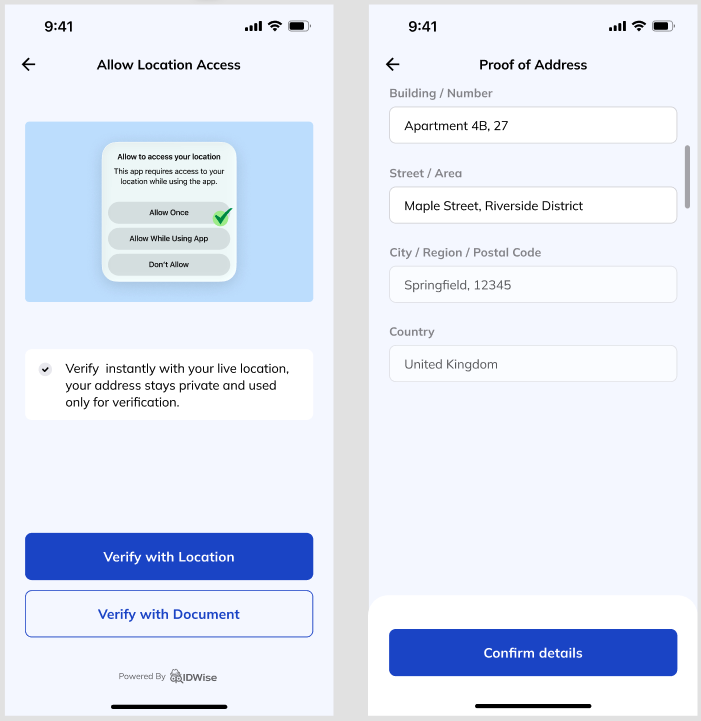
IDWise captures the user’s GPS location, converts it into a readable address, asks the user to review and adjust the address if needed, and checks whether the adjusted address remains close to the originally captured address. IDWise also supports GPS spoofing detection to help identify manipulated or unreliable location signals.
Prerequisites
Request location permission in your application before starting a GPS-based POA journey.
For mobile integrations, make sure your Android or iOS app asks the user for GPS/location access using the platform’s permission flow. IDWise can only capture the user’s GPS location if the device grants location access.
How It Works
GPS-based POA runs as part of an IDWise journey and follows this flow from location capture to result.
-
Capture GPS location
IDWise captures the user’s GPS coordinates from the device.
-
Convert GPS to address
IDWise converts the captured GPS coordinates into a readable address.
-
Ask the user to review the address
The user sees the converted address and can correct minor address details if needed.
-
Compare captured and adjusted addresses
IDWise compares the address generated from the original GPS location with the adjusted address submitted by the user.
-
Run GPS spoofing checks
IDWise checks for signals that may indicate the GPS location was spoofed or manipulated.
-
Return the result
The GPS-based POA result is returned as part of the journey outcome and can be retrieved through the Result Retrieval API.
Address Review and Adjustment
After the GPS location is converted into an address, the user can review the generated address before submission. This lets the user correct address details that may not be available or formatted correctly from the GPS-to-address conversion.
Examples of user adjustments include:
- Apartment or flat number
- Building name
- Street formatting
- Missing address details
IDWise compares the adjusted address with the original address generated from the captured GPS location. If the adjusted address is not close enough to the captured address, the check can be flagged.
This allows users to fix minor address details without allowing them to submit an address that is unrelated to the captured location.
Checks Performed
IDWise runs the following checks during GPS-based POA.
| Check | What it validates |
|---|---|
| Captured Address vs Adjusted Address Check | Confirms that the final address submitted by the user remains close to the address generated from the captured GPS location. |
| GPS Spoofing Detection | Detects signals that may indicate the GPS location was manipulated, spoofed, or captured from an unreliable source. In order to enable this check you need to add Device Intelligence block to your flow. |
Captured Address vs Adjusted Address Check
This check compares the address generated from the original GPS coordinates with the address submitted after user adjustment. It helps confirm that the final address remains consistent with the device location captured during the journey.
GPS Spoofing Detection
This check detects signals that may indicate the GPS location was manipulated, spoofed, or captured from an unreliable source.
When to Use GPS-Based POA
Use GPS-based POA when you want a faster address confirmation experience and do not need the applicant to upload an address document.
GPS-based POA is useful for flows where you want to:
- Reduce document collection during onboarding.
- Confirm the user’s current location-derived address, and you don't require exact door number.
- Let users correct minor address formatting issues before submission.
- Detect GPS spoofing or unreliable location signals.
If your policy requires document-backed address evidence, use Document-Based Proof of Address instead.
FAQ
Can the user edit the address after GPS capture?
Yes. After IDWise converts the GPS location into an address, the user can adjust minor address details such as apartment number, building name, street formatting, or missing address details.
What happens if the user changes the address too much?
IDWise compares the adjusted address with the original address generated from the captured GPS location. If the adjusted address is not close enough to the captured address, the check can be flagged.
Does IDWise detect GPS spoofing?
Yes. IDWise supports GPS spoofing detection to help identify manipulated or unreliable location signals.
When should I use document-based POA instead?
Use document-based POA when your verification policy requires evidence from an address document, such as a utility bill, bank statement, tax document, or lease agreement.
Related Pages
Updated 4 months ago