
AML Search Profiles & Matching
AML Search Profiles let you decide exactly which AML lists an applicant is screened against and how strictly names are matched. Instead of one screening setup for your whole business, you can create a separate profile for each flow. For example, one profile could screen EU customers against EU sanctions, and another could run a broader global PEP check for high-risk onboarding.
With search profiles you can:
- Pick specific lists from more than 1,000 sanctions, warnings, fitness & probity, PEP and adverse media collections.
- Combine several matching profiles in one search profile, each with its own lists and matching rules.
- Tune name fuzziness and noise-reduction rules to cut false positives without missing real hits (false negatives).
- Attach a different search profile to each flow through the AML block in the Flow Builder.
New to AML screening?For an overview of the screening lists, PEP levels, results and Ongoing Monitoring, see AML, PEP & Sanctions Screening.
Matching techniques
Fuzzy match
Fuzzy matching controls how closely a name must match the spelling of a list entry. It catches spelling variants, typos and transliterations, e.g. Mohammed / Mohamed / Muhammad.
- In a search profile you set this with the Name fuzziness slider, from 0% (Strict Match) to 100% (Broad Match). The higher the fuzziness, the more spelling variation is accepted.
- Up to 1 phonetic typo per word of the search term is allowed.
- Similarity has a bigger effect on short names than on long ones, because a single-letter difference is a larger share of a short word.
Exact match
Exact matching allows no spelling or phonetic variation. Word order can differ, e.g. John Smith matches Smith John, but extra words are not allowed. Titles such as Mr. or Dr. are compared as they are.
In a search profile, turn on Exact match only (all sources) or Adverse media exact match only (adverse media sources only).
Exact match vs strictest fuzzy match
Setting fuzziness to 0% is not the same as turning on Exact match only:
| Exact match only | Fuzzy match at 0% fuzziness | |
|---|---|---|
| Spelling variations | Not allowed | Not allowed |
| Word order | Can differ | Can differ |
| Extra words in the list entry | Not allowed | Allowed |
| Year of birth | Must match exactly | ±1 year tolerated |
| Name pre-processing | None | Names are normalised before comparison |
How it works
Search Profile  (e.g. "EU Customer Screening")
│   Countries: apply to all matching profiles
│
├── Matching Profile 1
│     ├── Datasets: EU sanctions lists
│     └── Matching configuration: fuzziness + rules
│
└── Matching Profile 2
      ├── Datasets: PEP + Adverse Media
└── Matching configuration: fuzziness + rules| Concept | What it is |
|---|---|
| Search Profile | The top-level configuration you attach to a flow's AML block. It has a name, an optional description, a country scope, and one or more matching profiles. |
| Matching Profile | A group of AML lists screened with the same matching rules. Use several matching profiles when different lists need different strictness, e.g. broad matching for sanctions and strict matching for adverse media. |
| Datasets | The AML lists (collections) included in a matching profile. Each has a category (Sanctions, Warnings, Fitness Probity, PEPs, Adverse Media) and a location. |
| Matching Configuration | How names are compared for that matching profile: the name fuzziness level plus optional rules that reduce noise or find more matches. |
When a journey reaches the AML block, IDWise screens the applicant against every matching profile in the selected search profile and returns the combined results in the journey.
Create a search profile
- In the IDWise Portal, go to Settings → AML Search Profiles.
- Click Add Profile.
- Enter a name (e.g. EU Customer Screening AML Search Profile) and, optionally, a description so your team knows what the profile is for.
- Under Countries apply to all matching profiles, keep Global (all countries) or select specific countries. This country scope applies to every matching profile in the search profile.
- Set up Matching Profile 1 (see below). To add more, click + Add Matching Profile.
- Click Save configuration.
At least one dataset is requiredYou can't save until every matching profile has at least one dataset selected.
Configure a matching profile
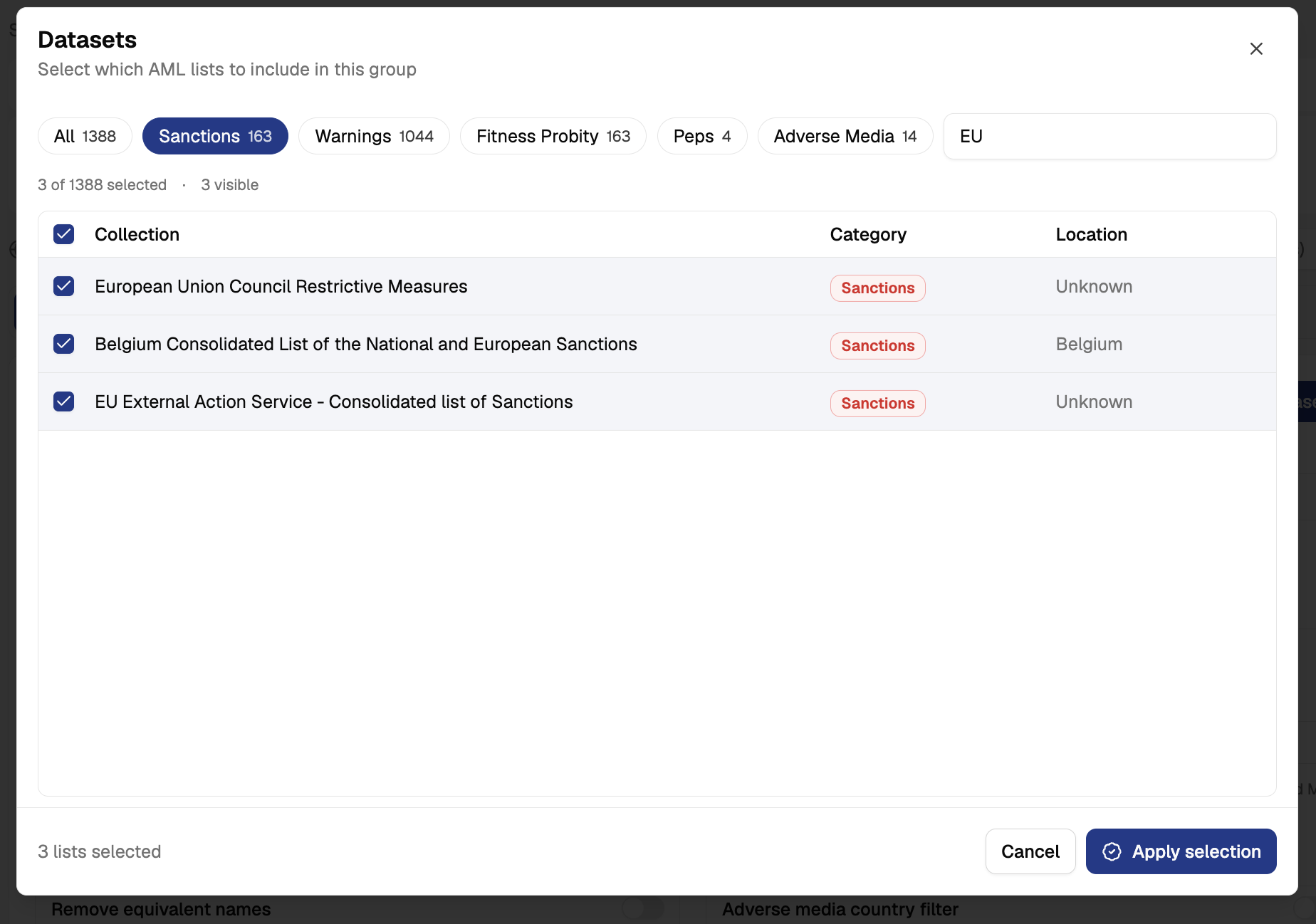
1. Select datasets
- In the Dataset section, click Edit Datasets.
- Filter by category (All, Sanctions, Warnings, Fitness Probity, Peps, Adverse Media) and/or type in the search box to find lists by name, e.g.
EU. - Tick the lists you want to include. Use the header checkbox to select every visible list at once.
- Click Apply selection.
The selected lists appear in the Dataset table with their Source, Category and Location, together with a summary of how many lists and entries are covered.
TipKeep matching profiles focused. Grouping lists that need the same strictness (e.g. all sanctions lists together) makes tuning much easier than mixing sanctions and adverse media in one group.
Configure the Matching Profile Paramters
You can configure different search paramters for each matching profile according to the senstivity of the datasets in your matching profile and your risk policy.
The following images has 2 sections:
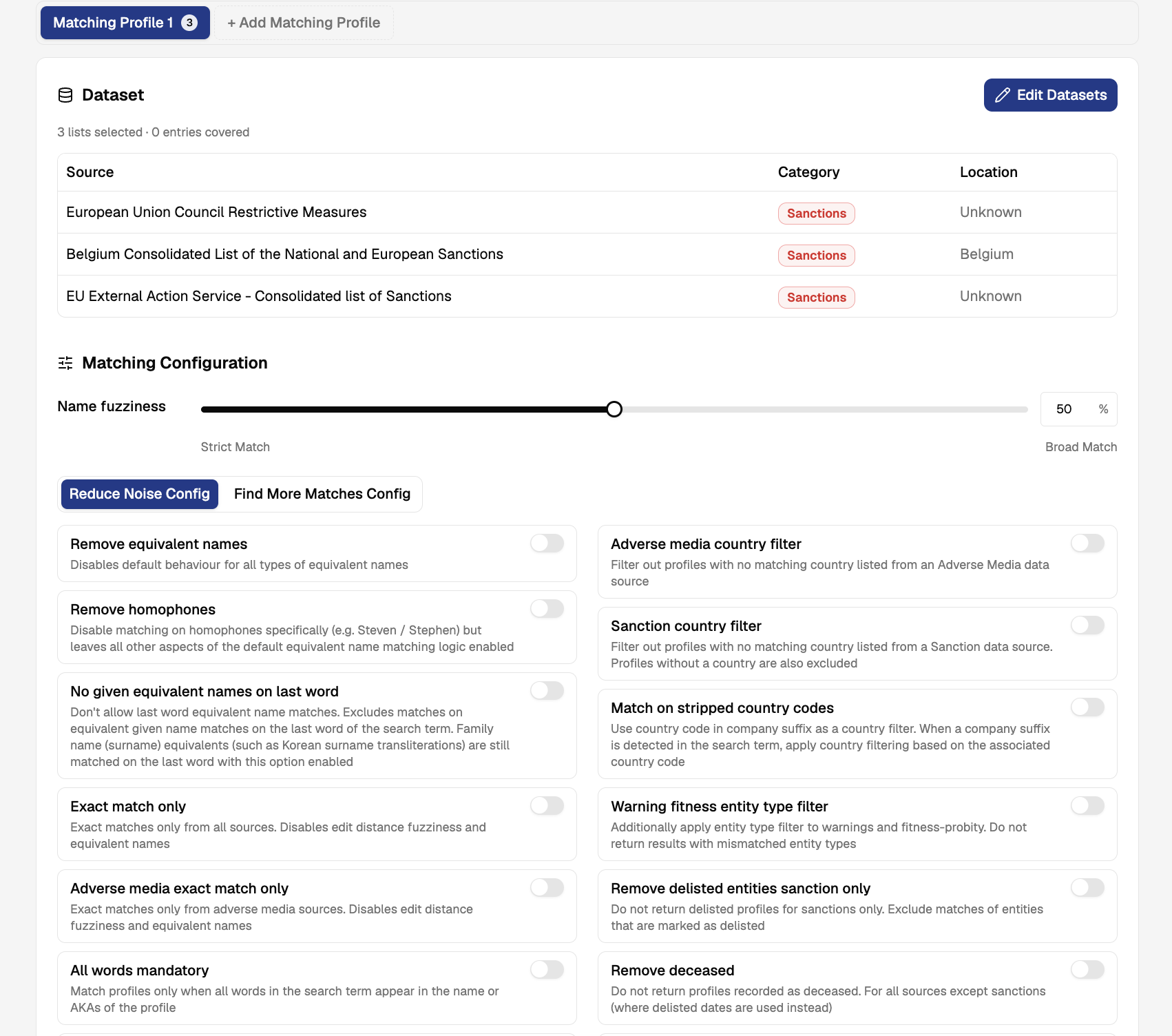
1. Configure Name Fuzziness
The Name fuzziness slider controls how closely a name must match a list entry, from 0% (Strict Match) to 100% (Broad Match). The default is 50%.
| Setting | Effect | Use when |
|---|---|---|
| Lower (towards Strict) | Fewer, more precise matches. Fewer false positives, but a higher risk of missing spelling variants. | Adverse media, large noisy lists, high-volume low-risk flows |
| Higher (towards Broad) | More matches, including spelling and transliteration variants. Fewer missed hits, more alerts to review. | Sanctions and other lists where missing a hit is not acceptable |
Fuzziness has a greater effect on short names than on long ones.
2. Adjust matching rules
Matching rules are grouped in two tabs:
- Reduce Noise Config: rules that remove low-value matches to lower false positives.
- Find More Matches Config: rules that widen matching to lower false negatives.
All rules are off by default. Turn a rule on with its toggle.
Reduce Noise Config
Name matching
| Rule | What it does |
|---|---|
| Remove equivalent names | Disables the default equivalent-name matching for all types of equivalent names. |
| Remove homophones | Disables matching on homophones only (e.g. Steven / Stephen); other equivalent-name logic stays on. |
| No given equivalent names on last word | Stops equivalent given names from matching on the last word of the search term. Surname equivalents (e.g. Korean surname transliterations) still match. |
| Exact match only | Exact matches only, across all sources. Disables fuzziness and equivalent names. |
| Adverse media exact match only | Exact matches only for adverse media sources. Disables fuzziness and equivalent names for those sources. |
| All words mandatory | Matches a profile only when every word of the search term appears in the profile's name or AKAs. |
| All words mandatory pep warn fp am | Same as above, applied to mentions from PEP, warning, fitness & probity and adverse media sources. |
| All words mandatory warn fp am | Same as above, applied to mentions from warning and fitness & probity sources. |
| No word to initial on last word | Stops the last word of the search term from matching an initial in the profile. |
| Remove weak alias | Ignores AKAs that the source marks as weak. |
Country and entity filters
| Rule | What it does |
|---|---|
| Adverse media country filter | Filters out adverse media profiles with no matching country. |
| Sanction country filter | Filters out sanctions profiles with no matching country. Profiles without a country are also excluded. |
| Match on stripped country codes | When a company suffix is detected in the search term, applies country filtering based on that suffix's country code. |
| Warning fitness entity type filter | Applies an entity-type filter to warnings and fitness & probity results and drops mismatched entity types. |
Profile status filters
| Rule | What it does |
|---|---|
| Remove delisted entities sanction only | Excludes sanctions profiles marked as delisted. |
| Remove deceased | Excludes profiles recorded as deceased (all sources except sanctions, where delisted dates are used instead). |
| Remove legacy pep entities | Removes older, less complete legacy PEP profiles that are being replaced. |
| Remove out of office peps 1yr | Hides PEP mentions for people out of office for more than 1 year. |
| Remove out of office peps 5yr | Hides PEP mentions for people out of office for more than 5 years. |
Check with your compliance teamRules such as Remove out of office PEPs or Sanction country filter can hide matches that your regulator may expect you to review. Confirm these settings against your AML policy before turning them on in production.
Use a search profile in a flow
- Open your flow in the Flow Builder.
- Add or select the AML block.
- In the block settings, choose the Search Profile to use.
- Save and publish the flow.
Each flow can use a different search profile, so you can apply stricter screening to high-risk products and lighter screening elsewhere.
Manage search profiles
Settings → AML Search Profiles lists all profiles for the selected business:
| Column | Description |
|---|---|
| Search Profile ID | Unique identifier of the profile. |
| Name | Profile name. |
| Matching Profiles | Number of matching profiles in the search profile. |
| Created by | User who created the profile. |
| Last Updated | Date of the last change. |
| Actions | Click the ✏️ icon to edit the profile. |
Example setups
These are starting points to adapt to your own risk policy, not compliance recommendations.
EU retail onboarding
| Matching profile | Datasets | Fuzziness | Rules |
|---|---|---|---|
| Sanctions | EU, UN, OFAC, UK HMT sanctions | 70–80% | Remove delisted entities sanction only |
| PEPs | PEP lists | 50% | Remove out of office peps 5yr, Remove legacy pep entities |
| Adverse media | Adverse media | 30–40% | Adverse media exact match only, Adverse media country filter |
Reducing alert volume on a high-volume flow
- Lower fuzziness on noisy lists (warnings, adverse media) before touching sanctions.
- Turn on All words mandatory to stop partial-name matches on common first names.
- Turn on Remove weak alias and Remove deceased.
- Review a sample of cleared alerts after each change to make sure no true matches are being dropped.
FAQ
Can I use the same search profile in multiple flows?
Yes. A search profile can be selected in the AML block of any flow in the same business.
Why can't I save my search profile?
Every matching profile needs at least one dataset. Open Edit Datasets on any empty matching profile and select at least one list.
What's the difference between a search profile and a matching profile?
The search profile is what you attach to a flow. Matching profiles sit inside it and let you apply different lists and rules to different parts of your screening.
Updated about 1 month ago